 QSL MAILER
QSL-Karten per E-Mail.
Alle auf einmal.
QSL cards by e-mail.
All in one go.
Log laden, Karte gestalten, senden. Der QSL Mailer holt die Adressen von QRZ.com, setzt jedem Funkpartner seine QSOs auf die Karte und verschickt sie über deinen eigenen Mailserver – mit Protokoll, Wiederholung und ohne Copy-&-Paste.
Load your log, design your card, hit send. QSL Mailer looks up addresses on QRZ.com, puts each station’s QSOs on its own card and sends them through your own mail server – with a log, retries and zero copy & paste.
Kostenlos, ohne Werbung, ohne Konto. Läuft lokal auf deinem PC.
Free, no ads, no account. Runs locally on your PC.
Alles drin, was ein QSL-Versand braucht
Everything a QSL run needs
Vom ADIF-Import bis zur letzten Mail – ohne Zusatzdienste, ohne Abo-Zwang.
From ADIF import to the very last mail – no extra services, no subscription lock-in.
ADIF-Import
ADIF import
Logs aus Log4OM, PoLo und jedem anderen Logprogramm. Filter nach Call, Datum, Band und Mode, Häkchen pro QSO.
Logs from Log4OM, PoLo and any other logger. Filter by call, date, band and mode, tick each QSO.
Layout-Editor
Layout editor
Eigene Kartenvorlage laden und Felder mit Maus oder Pfeiltasten platzieren. Export als JPG.
Load your own card artwork and place fields with mouse or arrow keys. Export as JPG.
QSO-Tabelle
QSO table
Die drei neuesten QSOs je Call landen automatisch als Tabelle auf der Karte.
The three latest QSOs per call are placed on the card as a table automatically.
Platzhalter
Placeholders
{CALL}, {MYCALL}, {MY_SOTA_REF}, {NAME}, {QSOS} – oder jedes beliebige ADIF-Feld.
{CALL}, {MYCALL}, {MY_SOTA_REF}, {NAME}, {QSOS} – or any ADIF field you like.
QRZ.com-Abfrage
QRZ.com lookup
E-Mail und Name per QRZ-XML, mit Kontakt-Cache. Adressen lassen sich auch manuell pflegen.
E-mail and name via QRZ XML, with a contact cache. Addresses can also be entered by hand.
HTML-Mail
HTML mail
Karte direkt im Mailtext plus JPG-Anhang, eigene Mailvorlage, optional BCC an dich selbst.
Card inline in the message plus JPG attachment, your own template, optional BCC to yourself.
Kontrollierter Versand
Controlled sending
Adressprüfung vorab, Testmail, Pause und Abbrechen. Fehlgeschlagene mit einem Klick erneut senden.
Address check up front, test mail, pause and cancel. Resend failed ones with one click.
Protokoll & Sicherheit
Log & security
Versandprotokoll über Neustarts hinweg, CSV der nicht Versendeten. Passwörter per Windows-DPAPI verschlüsselt.
Send log that survives restarts, CSV of unsent cards. Passwords encrypted with Windows DPAPI.
Die Frontplatte
The front panel
Links das Logbuch, rechts Karte und Versand – alles in einem Fenster.
Logbook on the left, card and mailing on the right – all in one window.
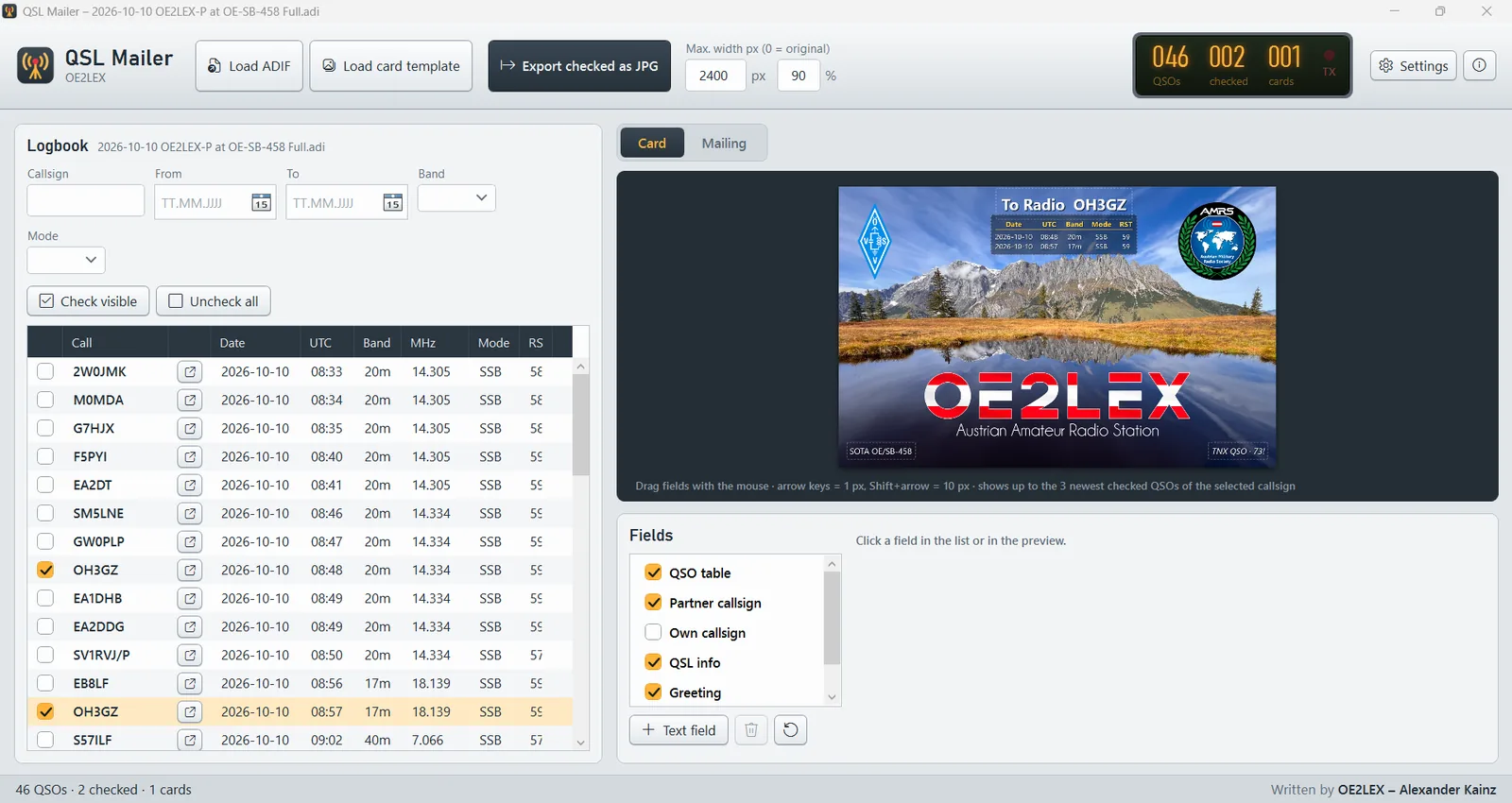
Felder mit der Maus ziehen oder mit den Pfeiltasten pixelgenau setzen. Das LCD zählt QSOs, markierte und Karten.Drag fields with the mouse or nudge them pixel by pixel with the arrow keys. The LCD counts QSOs, checked and cards.
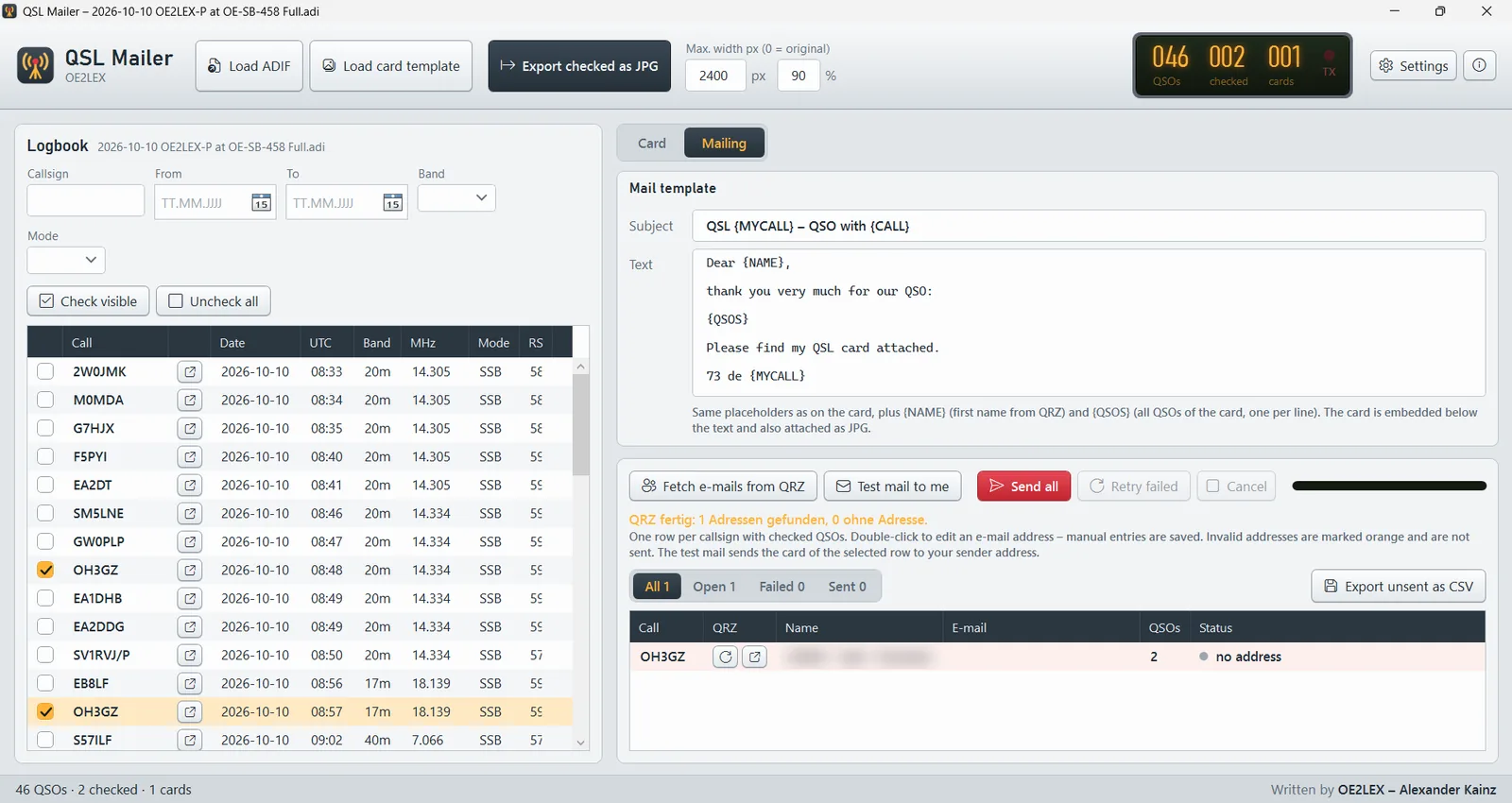
Mailvorlage mit Platzhaltern, Adressen von QRZ.com, Testmail und Versand – mit Filter für Offen, Fehler und Gesendet.Mail template with placeholders, addresses from QRZ.com, test mail and sending – filter by open, failed and sent.
Vom Logbuch ins Postfach
From logbook to inbox
Einmal eingerichtet, ist der nächste Contest-QSL-Versand eine Sache von Minuten.
Set it up once and your next contest QSL run takes minutes.
Log laden
Load log
ADIF-Datei öffnen, QSOs filtern und anhaken.
Open an ADIF file, filter and tick your QSOs.
Karte gestalten
Design card
Vorlage wählen, Felder wie {CALL} platzieren, Vorschau prüfen.
Pick your artwork, place fields like {CALL}, check the preview.
Adressen holen
Get addresses
QRZ.com liefert E-Mail und Name, die Adressprüfung zeigt, was fehlt.
QRZ.com supplies e-mail and name, the address check shows what is missing.
Senden
Send
Testmail, dann los. Die LCD zählt mit: gesendet, offen, Fehler.
Test mail, then go. The LCD keeps count: sent, open, errors.
Jede Karte persönlich
Every card personal
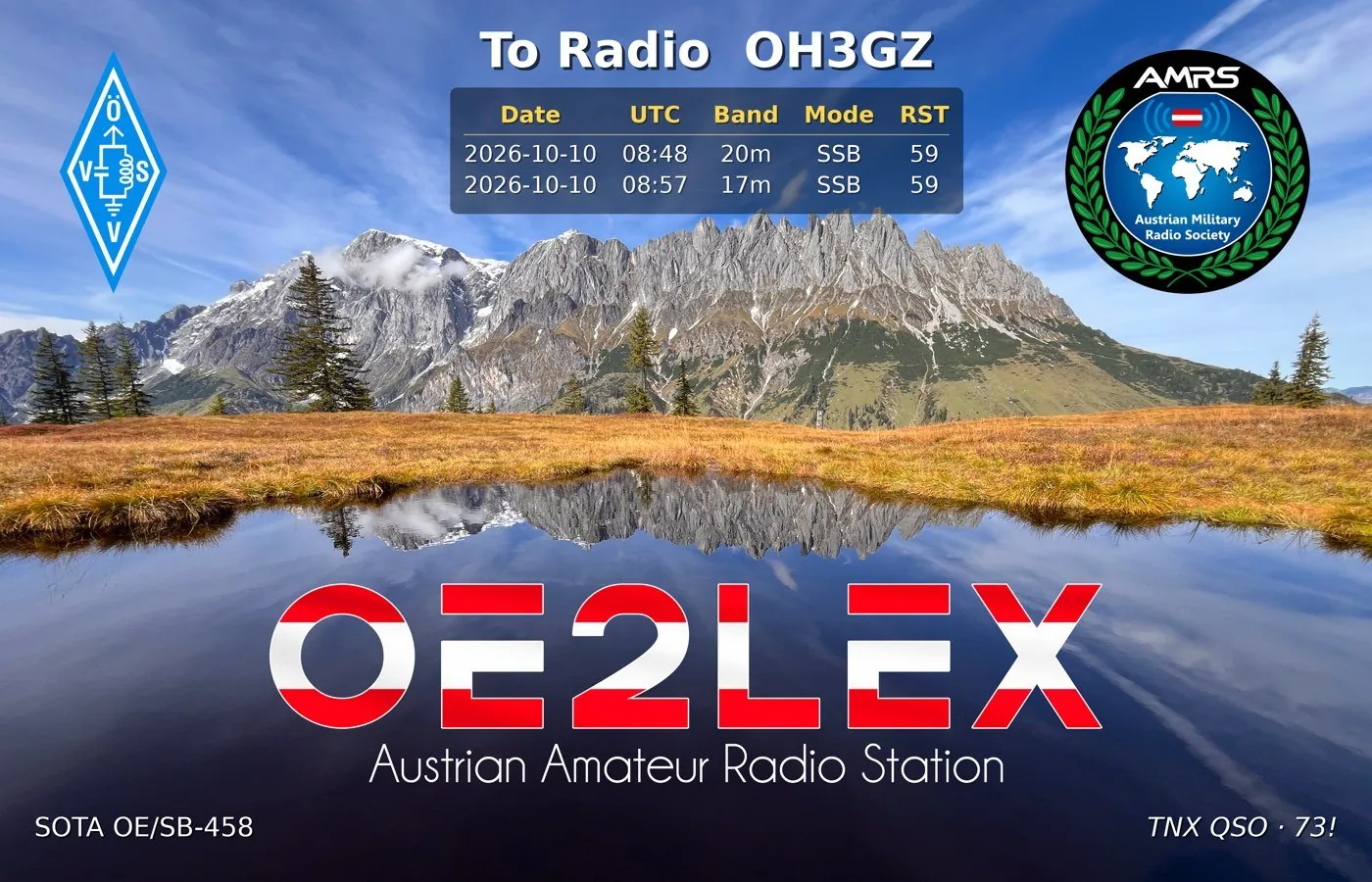
- Eigenes Kartenmotiv als HintergrundYour own artwork as background
- Call, Name und Referenzen als TextfelderCall, name and references as text fields
- Bis zu drei QSOs je Station in einer TabelleUp to three QSOs per station in a table
- Als JPG im Anhang und direkt im MailtextAs JPG attachment and inline in the mail
Bereit für den ersten Versand?
Ready for your first run?
Der QSL Mailer ist Freeware für Funkamateure. Keine Registrierung, keine Werbung, keine Telemetrie.
QSL Mailer is freeware for radio amateurs. No registration, no ads, no telemetry.
- Windows 10 oder 11 (64 Bit)Windows 10 or 11 (64-bit)
- Ein E-Mail-Konto mit SMTP-Zugang (z. B. dein Provider, Gmail mit App-Passwort)An e-mail account with SMTP access (e.g. your provider, Gmail with app password)
- Optional: QRZ.com-XML-Abo für die automatische AdresssucheOptional: QRZ.com XML subscription for automatic address lookup
- Dein Log als ADIF-DateiYour log as an ADIF file
Häufige Fragen
Frequently asked
Was kostet der QSL Mailer?
Nichts. Er ist Freeware – ohne Werbung, ohne Konto, ohne versteckte Kosten.
What does QSL Mailer cost?
Nothing. It is freeware – no ads, no account, no hidden costs.
Brauche ich ein QRZ.com-Abo?
Nur für die automatische Adresssuche: Die E-Mail-Adresse liefert QRZ.com über die XML-Schnittstelle, die ein XML-Abo voraussetzt. Ohne Abo trägst du Adressen einfach manuell ein – sie bleiben im Kontakt-Cache gespeichert.
Do I need a QRZ.com subscription?
Only for automatic lookups: QRZ.com returns e-mail addresses through its XML interface, which requires an XML subscription. Without one you simply enter addresses by hand – they stay in the contact cache.
Über welchen Mailserver wird versendet?
Über deinen eigenen, per SMTP. Das funktioniert mit praktisch jedem Anbieter. Bei Gmail oder Outlook brauchst du meist ein App-Passwort. Mit der Testmail prüfst du die Einstellungen vorab.
Which mail server is used?
Your own, via SMTP. That works with virtually any provider. Gmail or Outlook usually need an app password. The test mail lets you check your settings first.
Werden meine Daten irgendwohin geschickt?
Nein. Das Programm läuft lokal. Es spricht nur mit QRZ.com (für die Abfrage) und mit deinem Mailserver. Passwörter werden mit Windows-DPAPI verschlüsselt gespeichert.
Is my data sent anywhere?
No. The program runs locally. It only talks to QRZ.com (for lookups) and to your mail server. Passwords are stored encrypted with Windows DPAPI.
Welche Logprogramme werden unterstützt?
Alle, die ADIF exportieren können – getestet unter anderem mit Log4OM und PoLo.
Which loggers are supported?
Any logger that exports ADIF – tested with Log4OM and PoLo, among others.
Was passiert, wenn eine Mail nicht rausgeht?
Sie landet im Filter „Fehler“. Du kannst Fehlgeschlagene gesammelt erneut senden oder die nicht versendeten als CSV exportieren. Das Protokoll bleibt auch nach einem Neustart erhalten.
What if a mail fails?
It ends up under the “Errors” filter. Resend all failed ones at once or export the unsent ones as CSV. The log survives a restart.